Chromebook Plus Spin 714 2024 Specs, Features, and Value: Is it worth the price tag?
The Chromebook Plus Spin 714 2024 is Acer's attempt to bridge premium hardware and ChromeOS convenience in a convertible 14-inch form factor aimed at students, professionals who need a light secondary machine, and anyone who values battery life and touch/stylus input in a laptop that doubles as a tablet. This article examines the Spin 714's design, display, performance, battery life, I/O and real-world usability, and then evaluates whether the machine's positioning and price make it a sensible buy compared with other Chromebooks and thin-and-light laptops.
Introduction: where the Spin 714 fits in the market
Chromebooks have matured beyond cheap classroom devices: models like the Chromebook Plus Spin 714 target buyers who want robust hardware, a responsive touch experience, and slightly more compute than entry-level Chromebooks provide. The 2024 refresh keeps the convertible hinge and pen support while bringing updated internals and refined materials. For many, the choice is less about raw speed and more about workflow — cloud-first usage, web apps, Android apps, and Linux development inside ChromeOS. The question becomes whether the Spin 714 provides the right balance of build quality, battery, display, and port selection for the premium Chromebook price bracket.
Detailed product review and analysis
Design and build quality
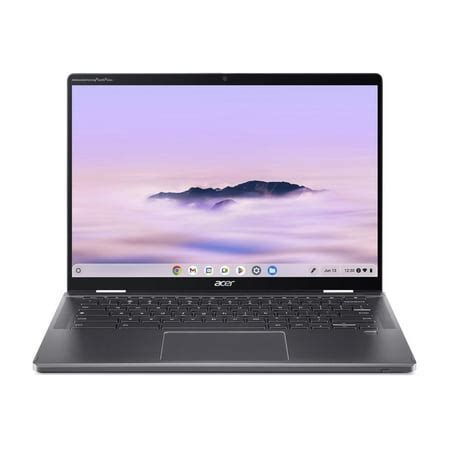
The Spin 714 2024 follows a professional, understated aesthetic: an aluminum chassis with tight tolerances and a hinge designed for frequent folding between laptop and tablet modes. The convertible design is lighter and stiffer than many plastic-bodied Chromebooks, making it more comfortable for lap use and travel. The keyboard deck has a slight depression around the keycaps for a cleaner look, and the lid resists fingerprints better than glossy plastics.
Weight and dimensions are competitive for a 14-inch 2-in-1: it’s portable enough for daily commuting while still feeling substantial. The 360-degree hinge is engineered for a stable pen-in-tablet orientation and can tolerate normal pressure from stylus use without excessive wobble.
Display: touch, color and versatility
Acer equips the Spin 714 with a high-resolution touch display tuned for productivity. The screen is sharp and responsive, with consistent viewing angles and enough brightness for indoor use and moderate outdoor visibility. Color reproduction is suitable for web content, photo editing at an amateur level, and watching video streams.
For buyers who prioritize reading, writing, and spreadsheet work, the Spin 714’s display provides a comfortable canvas. The touchscreen and included active stylus support add real value for note-taking, PDF annotation, and casual creative tasks. Expect slightly more reflection than matte display panels, but the tradeoff is the more accurate and responsive touch/stylus feel.
Performance and configuration options
Chromebook Plus Spin 714 2024 configurations span from efficient, everyday chips to higher-performance options intended for heavier multitasking and Linux-based development. The point of Chromebooks is optimized performance for web apps and cloud workloads—ChromeOS itself remains light and responsive—so even the base configurations deliver good real-world snappiness for email, web conferencing, streaming, and document work.
For multi-tab power users, look for configurations with higher RAM (8–16 GB) and faster storage. Those doing local Linux development, light Docker work, or frequent multi-window workflows will benefit from beefier specifications. In practice, ChromeOS offloads a lot to the cloud, so massive local storage is less critical than adequate RAM and a responsive SSD.
Battery life
Battery life on the Spin 714 2024 is solid for a convertible. Under light mixed use—web browsing, streaming audio, and document editing—expect a day of typical use without charging. Heavier workloads such as extended video playback, virtual machine usage, or continuous video conferencing will reduce runtime, but the machine still returns competitive endurance compared with similar premium Chromebooks.
Charging is convenient with USB-C, and the machine supports relatively fast top-ups to get back to a comfortable working level quickly. For users on the move, the dependable battery life is a major selling point.
Shop the latest Electronics picks on Amazon.
View Offers →Keyboard, trackpad and stylus
The keyboard on the Spin 714 is comfortable with good key travel for a thin convertible. Typing for extended periods is feasible, and the layout minimizes accidental presses while using tablet mode. The trackpad is precise and supports ChromeOS gestures smoothly.
The active pen is included with many configurations and offers low-latency input for note-taking and sketching. Palm rejection and pressure sensitivity are good enough for casual illustration and detailed annotation, though professional artists may prefer dedicated drawing tablets for advanced pressure curves and brush dynamics.
Ports and expandability
A practical mix of ports is one of the Spin 714’s strengths. Buyers typically find at least two USB-C ports suitable for charging and external displays, a full-size USB-A port for legacy peripherals, and a microSD or full-size SD card reader for quick file transfers. Wi-Fi and Bluetooth are current-generation standards and provide reliable connectivity for streaming and conferencing.
This selection supports common workflows: hooking up to a dongle or dock for multi-monitor setups, transferring photos from a camera, or plugging in wired peripherals during travel or presentations.
Software, security and ChromeOS features
ChromeOS continues to evolve, and the Chromebook Plus program adds a few software niceties and extended update windows to selected models. Buyers benefit from built-in security features like sandboxing, verified boot, and automatic updates. ChromeOS’s integration with Android apps and Linux (Beta) expands the device’s utility beyond strictly web-based tasks.
For education buyers, the combination of stylus support, durable hinge, and robust update policy makes the Spin 714 an attractive classroom device. For professionals, the ability to run Linux tools and maintain a lightweight, secure environment is a clear advantage.
Speakers, webcam and microphone
Built-in speakers on the Spin 714 are clear enough for video calls and streaming. They won’t replace desktop speakers for immersive music listening but are adequate for the majority of productivity scenarios. The webcam and microphone quality are optimized for conferencing; expect solid noise rejection and image clarity in well-lit environments. Users who frequently present from dim rooms should consider additional lighting or an external webcam for best results.
Real-world use cases
- Students: Note-taking with a stylus, long battery life for classes, reliable web app performance for homework and research.
- Remote workers: Lightweight travel, solid video call performance, and multi-tasking for spreadsheets, tabs, and collaboration tools.
- Hybrid creatives: Casual photo editing, annotation, and sketching — especially useful for content creators who primarily work in cloud-based tools.
- Developers (light): ChromeOS with Linux (Beta) supports many development workflows, though power users who run resource-heavy containers may prefer more powerful Windows or macOS laptops.
- Frequent travelers: Durable chassis, convertible modes, and good port selection make it a practical travel companion that can double as an entertainment device on flights.
Pros & Cons
- Pros:
- Premium aluminum build and convertible design — durable yet portable.
- Responsive touchscreen with active pen support for notes and annotations.
- Good battery life for full-day mixed use.
- Solid port selection that includes legacy and modern connectivity.
- ChromeOS security and automatic updates make it low-maintenance.
- Cons:
- Priced above basic Chromebooks; value depends on how much the buyer uses pen and convertible features.
- Not aimed at heavy local compute loads—intensive local video editing or large-scale virtualization will outpace it.
- Display reflectivity and speakers are good but not class-leading for multimedia enthusiasts.
- Some configurations may skimp on RAM or storage; buyers should choose higher-tier specs for longevity.
Comparison: configuration tiers at a glance
| Category | Base Configuration | Recommended (Everyday Power) | Performance-Focused |
|---|---|---|---|
| CPU | Energy-efficient dual/quad-core — enough for web, docs, streaming | Mid-level multicore CPU for multitasking | Higher-clocked multicore CPU for heavier multitasking and local dev |
| RAM | 4–8 GB | 8–16 GB | 16 GB |
| Storage | 64–128 GB eMMC/SSD | 128–256 GB SSD | 256 GB+ NVMe SSD |
| Display | Full HD touchscreen | High-res 14-inch touchscreen with stylus support | High-res touchscreen, higher brightness and color accuracy |
| Battery | All-day light use | All-day mixed use | All-day but shorter under heavy load |
| Ports | 1–2 USB-C, 1 USB-A | 2 USB-C (charging + DP), USB-A, card reader | Same as recommended, possibly with faster USB-C/TB support |
| Best for | Students on a budget; casual users | Most buyers who want balance and longevity | Power users who rely on local Linux workflows or heavy multitasking |
Buying guide: what to check before choosing a Spin 714
1. Confirm the configuration matches your workload
If the primary tasks are web browsing, streaming, and document editing, a mid-level configuration with 8 GB of RAM and an SSD is likely sufficient. If the buyer plans to run Linux tools, keep many tabs open, or work with larger local files, prioritize 16 GB of RAM and a faster SSD.
2. Verify the included stylus and pen features
The Spin 714’s pen support is a major selling point. Check whether the model includes an active pen in the box or if it’s sold separately. Also confirm pen latency and pressure sensitivity if note-taking or annotation are core needs.
Looking for the best Electronics deals on Amazon?
See Deals →3. Pay attention to ports and external display support
People who dock at a desk regularly should verify the number of USB-C ports and whether they support external displays and charging simultaneously. A microSD or SD card reader is helpful for photographers who want to transfer files without an adapter.
4. Battery expectations and charging speed
Battery life claims vary by usage pattern. Look for independent reviews or manufacturer-stated mixed-use runtimes. Fast-charge support can be more useful than a marginally bigger battery if the buyer frequently needs quick top-ups during travel.
5. Software support and update policy
ChromeOS devices receive automatic updates for a specified period. Confirm the update window for the specific 2024 Spin 714 configuration; longer update windows increase the device’s usable lifetime and security posture.
6. Price vs. alternatives
Compare the total cost with other premium Chromebooks and ultraportables. If the buyer highly values convertibility, pen input, and ChromeOS security, the Spin 714 can justify a higher price. If not, a traditional clamshell Chromebook or a Windows ultrabook may provide better value for specific workflows.
Is the Chromebook Plus Spin 714 2024 worth the price?
The answer depends on what a buyer values. The Spin 714 is best seen as a premium Chromebook: it elevates build quality, provides a versatile convertible design with pen support, and offers a balance of battery life and everyday performance. For students who annotate lecture slides, professionals who use cloud-first productivity suites, and travelers who want a device that doubles as an entertainment tablet, the Spin 714 is a compelling option.
However, budget-oriented shoppers who rarely use the pen or convertible features will find better value in more economical Chromebooks. Likewise, buyers who need sustained heavy local compute—such as professional video editors, 3D artists, or people who run many heavyweight virtual machines—should look at Windows or macOS machines with more powerful CPUs and GPUs.
Conclusion
The Chromebook Plus Spin 714 2024 delivers a convincing mix of premium design, convertible flexibility, and ChromeOS convenience. It shines in workflows that benefit from touch and pen input, and it offers a comfortable balance of portability and endurance for daily productivity. Whether it is worth the price depends on whether the buyer prioritizes a premium convertible experience and extended ChromeOS support. For those buyers, the Spin 714 is a strong contender; for others who prioritize raw local performance or strict budget constraints, there are alternative paths that may provide better value.