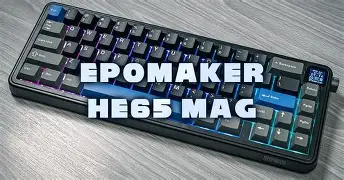
I Switched to the Epomaker He65 Mag and Here is What Happened
The landscape of laptop peripherals has shifted dramatically over the last few years. While laptop manufacturers continue to refine their built-in chicklet keyboards, enthusiasts and power users have increasingly turned to external mechanical solutions to bridge the gap between portability and tactile performance. Among the most significant advancements in this space is the rise of Hall Effect magnetic switches. The Epomaker He65 Mag represents a pivotal entry into this category, aiming to provide laptop users with a compact, high-performance typing experience that leverages magnetic technology rather than traditional mechanical contacts. For anyone who spends hours tethered to a laptop, the interface is the single most important point of contact with their digital work, and a switch to a magnetic board like the He65 Mag is more than just a change in sound; it is a fundamental shift in how the hardware interprets human intent.
When a user decides to move away from a standard laptop deck or even a traditional mechanical keyboard, they are usually looking for three things: speed, customization, and durability. The Epomaker He65 Mag addresses these by utilizing magnetic switches that allow for adjustable actuation points and Rapid Trigger functionality. For the modern laptop user who oscillates between heavy typing sessions and competitive gaming, this versatility is a game-changer. This article explores the nuanced transition to this magnetic keyboard, analyzing the technology, the ergonomics of its 65% layout, and the tangible impact it has on productivity and gaming performance in a mobile-first environment.
The Shift to Hall Effect Technology
To understand what happens when one switches to the He65 Mag, one must first understand what makes a magnetic keyboard different from a traditional one. Most mechanical keyboards rely on a physical metal contact to send a signal to the computer. When you press a key, two pieces of metal touch, completing a circuit. In contrast, the He65 Mag utilizes Hall Effect sensors. These sensors measure the position of a magnet located within the switch stem. Because there is no physical contact required to register a keypress, the keyboard can determine exactly how far down a key is pressed at any given millisecond.
This technology allows for a feature known as adjustable actuation. On a standard laptop, the keys have a fixed travel and a fixed registration point. With the He65 Mag, users can define exactly where the key "clicks" in the software. This means one could set a very shallow actuation point for gaming, where speed is paramount, and a deeper, more deliberate actuation point for typing to prevent accidental mistypes. When switching from a shallow laptop keyboard to this magnetic beast, the immediate sensation is one of profound control. The keyboard essentially adapts to the user's specific finger pressure and typing style, rather than forcing the user to adapt to the hardware.
Design and Build Quality for the Laptop User
The "Mag" in He65 Mag refers to its magnetic switches, but it also hints at a build quality that feels substantial. For laptop users, desk space is often at a premium. The 65% form factor is widely considered the "sweet spot" for productivity. It eliminates the bulky number pad and the often-redundant function row but retains the dedicated arrow keys and a few essential navigation keys like Delete and Page Up/Down. This compact footprint allows the keyboard to sit comfortably in front of a laptop stand without pushing the laptop too far back, maintaining a healthy ergonomic distance for the eyes.
The chassis of the He65 Mag is designed with a focus on stability. One of the most jarring things about switching from a built-in laptop keyboard to an external one is the potential for "drift" or movement during intense sessions. The He65 Mag features a heavy-duty casing that stays anchored. The keycaps are typically crafted from high-quality PBT, which resists the "shine" that occurs on laptop keys after a few months of skin oil exposure. This ensures the keyboard feels as fresh after a year of use as it did on day one.
Analytical Review: The User Experience
Transitioning to the Epomaker He65 Mag brings about several immediate changes in the computing workflow. The first is the elimination of the "bottoming out" fatigue. Laptop keyboards, due to their slim profile, have very short travel distances (usually 1.0mm to 1.5mm). Users often hit the backplate with significant force, leading to finger fatigue over long workdays. The He65 Mag provides a full 4.0mm of travel, but because of the magnetic sensors, you don't actually need to bottom out to register a stroke. This creates a "pillow-like" typing experience that is significantly more sustainable for professional writers and coders.
Furthermore, the Rapid Trigger feature is perhaps the most significant functional change for those who game on their laptops. In traditional keyboards, a key must travel back up past a reset point before it can be pressed again. With Rapid Trigger on the He65 Mag, the key resets the instant it starts moving upward. This allows for incredibly fast repeated inputs, which is particularly useful in rhythm games, first-person shooters, and even complex macro-heavy productivity tasks. The level of "snappiness" found here is impossible to achieve on a standard laptop deck.
Find top-rated Laptops & Computers products at great prices.
View Offers →Software Integration and Customization
A keyboard like the He65 Mag is only as good as its software suite. When switching to this device, the user gains access to a level of granular control that is usually locked away in laptop BIOS settings. The Epomaker software allows for the mapping of multiple layers. For instance, while the physical function row is missing, a laptop user can map those functions to a secondary layer, accessible via a "FN" key. This means controlling screen brightness, volume, and media playback is often faster on the He65 Mag than on the laptop’s own keyboard once the muscle memory is established.
The RGB lighting is another area where the switch is felt. Many high-end laptops have per-key RGB, but the intensity and diffusion on the He65 Mag are generally superior due to the transparent switch housings and the depth of the board. For users who work in low-light environments, the ability to color-code specific key zones—such as highlighting coding shortcuts or gaming clusters—adds a layer of functional aesthetic that built-in keyboards cannot match.
Pros and Cons of the Epomaker He65 Mag
Every hardware switch involves trade-offs. While the He65 Mag offers bleeding-edge technology, it is important to weigh its benefits against the logistical realities of laptop usage. Below are the primary advantages and disadvantages observed after an extended period of use.
- Unmatched Customization: The ability to change actuation points from 0.1mm to 4.0mm allows for a truly personalized typing experience that can change depending on the task at hand.
- Superior Durability: Since there are no physical leaf springs to wear out or oxidize, magnetic switches have a lifespan significantly longer than traditional mechanical or membrane switches.
- Rapid Trigger Technology: This provides a competitive edge in gaming and a faster response time in high-speed typing that feels modern and fluid.
- Compact 65% Layout: It saves desk space and is easier to transport in a laptop bag than a full-sized or TKL (Tenkeyless) board.
- Hot-Swappable Capability: While magnetic switches are specialized, many of these boards allow for easy maintenance and switch replacement without soldering.
- Improved Ergonomics: Elevating the hands on a dedicated board versus the flat laptop deck can reduce wrist strain, especially when paired with a wrist rest.
- Learning Curve: Moving from a 100% or laptop layout to a 65% layout requires learning key combinations for the function row and numpad.
- Portability Bulk: While compact, it is still a significant addition to a laptop bag compared to not carrying an external keyboard at all.
- Software Reliance: To get the most out of the Hall Effect sensors, users must interface with the manufacturer's software, which may not be as robust as some open-source alternatives.
- Acoustic Presence: Even quiet mechanical keyboards are louder than laptop membranes, which might be a consideration for those working in quiet offices or libraries.
Comparison: He65 Mag vs. Other Inputs
To provide a clear picture of where this keyboard stands, it is helpful to compare it against the three most common keyboard types a laptop user might encounter. The following table highlights the core differences in technology and utility.
| Feature | Standard Laptop Keyboard | Traditional Mechanical | Epomaker He65 Mag |
|---|---|---|---|
| Switch Type | Scissor/Membrane | Contact-based Mechanical | Hall Effect (Magnetic) |
| Actuation Point | Fixed (usually shallow) | Fixed (determined by switch) | Adjustable (0.1mm to 4.0mm) |
| Rapid Trigger | No | No | Yes |
| Travel Distance | ~1.2mm | ~3.6mm to 4.0mm | ~4.0mm |
| Lifespan | Moderate (5-10m clicks) | High (50-100m clicks) | Ultra-High (100m+ clicks) |
| Portability | Built-in | Low to Moderate | High (65% factor) |
Buying Guide: Is the He65 Mag Right for You?
Deciding to invest in a magnetic keyboard requires an assessment of your specific use cases. Not every laptop user needs the precision of Hall Effect sensors, but for certain demographics, the He65 Mag is almost revolutionary. When looking at this product, consider the following factors to determine if it fits your lifestyle.
For the Competitive Gamer
If your laptop is essentially a portable gaming station, the He65 Mag is a logical upgrade. The ability to set the "W, A, S, D" keys to a hair-trigger actuation (0.2mm) while keeping your chat keys at a deeper actuation (2.0mm) prevents accidental ultimates or movement errors. The Rapid Trigger functionality is the current gold standard in the gaming industry, making this board a future-proof investment for those who play shooters or action titles.
For the Professional Typist and Coder
Writers and developers care about rhythm and fatigue. The linear nature of magnetic switches provides a smooth, consistent feel across every key. Unlike some mechanical switches that can feel "scratchy" or inconsistent, the magnetic sensors offer a clean stroke. If you find your fingers hurting after a 3,000-word session on your laptop, the increased travel and customizable registration of the He65 Mag will likely alleviate much of that discomfort.
Discover deals on Laptops & Computers — updated daily.
View Offers →For the Desk Minimalist
If you value a clean workspace, the 65% layout is visually pleasing and functional. It allows for a more centered posture. Many laptop users off-center their mouse to the right because of the laptop's width; with the He65 Mag, you can keep your mouse closer to your body, reducing shoulder strain. However, if your work involves heavy data entry in Excel, you may miss the dedicated number pad, though this can be remedied with a separate, inexpensive macro pad or by learning the top-row number keys.
Key Factors to Check Before Purchase
Before purchasing, ensure that your laptop has an available USB port or that you have a compatible dongle, as many modern ultrabooks are moving exclusively to USB-C. Additionally, check if you are comfortable with "Layered" functionality. If you frequently use F-keys (like F5 for refresh or F11 for full screen), you must be willing to use the "FN + Number" shortcut. For most, this becomes second nature within three to four days of consistent use.
What Happens to Your Workflow?
The most profound change that happens after switching to the Epomaker He65 Mag is the realization of how restrictive standard keyboards can be. In the first week, there is a period of adjustment where the sensitivity of the magnetic switches might lead to some accidental double-spaces or character repeats if you set the actuation too shallow. However, once the "sweet spot" is found—perhaps 1.8mm for general use—typing becomes an effortless flow. The physical feedback and the stability of the keys create a sense of confidence in every stroke.
In gaming, the results are often more immediate. You will notice that "counter-strafing" in games like Counter-Strike or Valorant becomes significantly more precise because the keyboard knows exactly when your finger has released tension on the key. The latency is virtually non-existent, and the board’s inability to "debounce" in the traditional sense (thanks to the magnetic sensor) means your inputs are as raw and direct as the hardware allows.
Conclusion
The transition from a standard laptop interface to the Epomaker He65 Mag is a significant upgrade that touches every aspect of the digital experience. By moving away from mechanical contacts and embracing the precision of Hall Effect sensors, the He65 Mag offers a level of responsiveness and customization that was once reserved for high-end laboratory equipment. It transforms the keyboard from a static tool into a dynamic assistant that can be tuned for speed, comfort, or accuracy. While the compact layout requires a brief adjustment period, the long-term benefits of reduced fatigue, increased hardware longevity, and superior gaming performance make it a compelling choice for any laptop power user. In an era where we interact with our screens for the majority of our waking hours, investing in a high-quality interface like the He65 Mag is one of the most effective ways to enhance both productivity and enjoyment.